10 Best Productivity Apps for Modern Learners in 2026

10 Best Productivity Apps for Modern Learners in 2026
Modern learning is no longer tied to one classroom or one notebook. Most learners juggle online courses, live sessions, project work, and self-study paths at the same time. The right productivity apps can remove friction and help you stay consistent even when your schedule shifts week to week.
Why you can trust this list
This selection focuses on workflow outcomes instead of feature checklists. Each app is included because it solves a specific learner bottleneck: planning, capture, revision, focus, or execution. The goal is a lightweight, repeatable system rather than app overload.
App fit quick table
| App | Best For | Setup Complexity | Main Risk | | --- | --- | --- | --- | | Notion | Structured learning dashboards | Medium | Over-customizing instead of studying | | Todoist | Fast task tracking | Low | Poor prioritization without weekly review | | Google Calendar | Time-blocked planning | Low | Over-scheduling unrealistic days | | Obsidian | Linked long-term knowledge | Medium | High initial setup friction | | Forest | Phone distraction control | Low | Inconsistent routine usage | | Anki | Spaced repetition memory | Medium | Weak cards from weak notes | | ChatGPT | Planning and explanation support | Low | Passive learning if overused |
What makes an app useful for learners
A useful app does three things well: captures information quickly, helps you retrieve it later, and supports execution. Apps that only look good but do not improve your workflow become distractions.
Before downloading another tool, identify your bottleneck. Is it planning, note organization, focus, revision, or accountability? Match tools to bottlenecks.
1) Notion
Notion remains one of the best learning workspaces for organizing courses, notes, reading lists, and assignment trackers in one place. You can create a dashboard for each semester and connect tasks with resources.
2) Todoist
Todoist is excellent for lightweight task management. It is fast, clean, and works across devices. Use labels for courses and recurring tasks for daily revision habits.
3) Google Calendar
Calendar discipline matters for learners. Google Calendar is still the easiest way to run time-blocking with reminders. Use color-coded blocks for deep work, review, and admin.
4) Obsidian
Obsidian is ideal for learners who want linked thinking and long-term knowledge capture. Notes are local, fast, and highly flexible. It is especially useful for conceptual subjects where ideas connect over time.
5) Forest
Forest helps reduce phone distractions by turning focus sessions into a simple game. It is effective for Pomodoro-style sessions and gives visual proof of focused time.
6) Readwise Reader
If you consume many articles and highlights, Readwise Reader helps centralize and review insights. It is useful for turning passive reading into active recall.
7) Grammarly
Clear writing improves assignments, applications, and communication. Grammarly helps with grammar, clarity, and tone so your ideas are understood quickly.
8) Anki
For memorization-heavy learning, Anki remains unmatched. Spaced repetition helps retain concepts efficiently over weeks and months.
9) Clockify
Clockify helps you understand where your time actually goes. Time tracking reveals hidden leaks and helps calibrate your plans.
10) ChatGPT
ChatGPT is useful for planning, explanation, and first-draft generation. Use it for support, not replacement. Your understanding still needs active practice.
How to combine these apps without overload
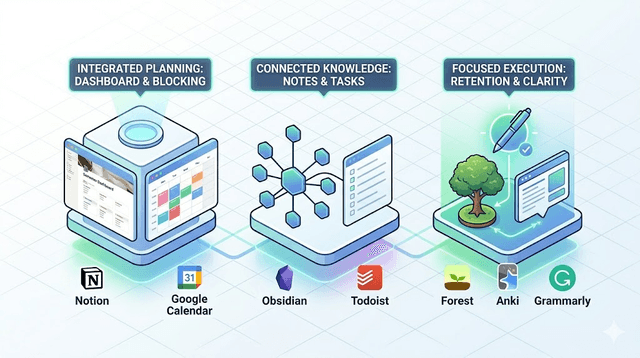
Use a simple three-layer system:
- Planning layer: Calendar + Todoist.
- Knowledge layer: Notion or Obsidian.
- Execution layer: Forest + Anki + ChatGPT support.
This setup covers planning, learning, and focus without excessive complexity.
Recommended stacks by learner type
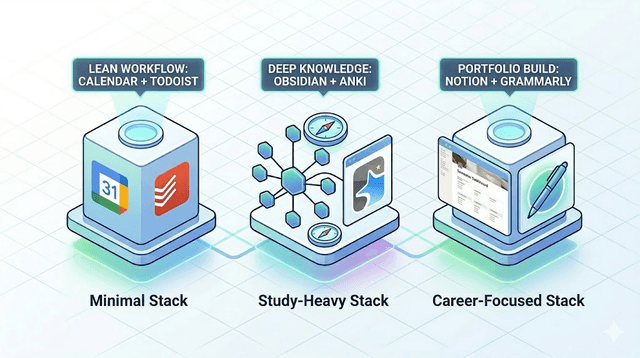
Minimal stack
- Google Calendar
- Todoist
- Grammarly
Study-heavy stack
- Google Calendar
- Obsidian or Notion
- Anki
- Forest
Career-focused stack
- Notion
- Google Calendar
- Grammarly
- Readwise Reader
Weekly review routine
Every Sunday, review what worked. Remove one unnecessary app if your system feels heavy. Productivity is not about owning many tools. It is about reducing friction so you can show up consistently.
Common mistakes to avoid
- Installing too many tools before defining one bottleneck
- Using multiple apps for the same function
- Skipping weekly cleanup of tasks and notes
- Treating tool usage as progress instead of measuring real output
Free versus paid: where spending actually helps
Most of these tools have capable free tiers, and learners rarely need to pay early. A few cases where upgrading is genuinely worth it:
- Notion is free for individual use and students can often unlock more through education programs, so paying is seldom necessary at first.
- Todoist free covers basic task management; the paid tier mainly helps if you rely on reminders and labels heavily.
- Anki is free on desktop and Android; the one notable cost is the iPhone app, which is paid and funds development.
- Forest is a small one-time or low-cost purchase on some platforms, which itself adds a little commitment that improves usage.
- Readwise Reader is subscription-based, so it earns its cost only if you read and review enough to justify it.
The rule: pay for a tool only after a free trial proves it removes a real bottleneck you face weekly. Paying in advance to "get serious" usually just adds a subscription, not a habit.
Pro tips for the apps that reward setup
A few of these tools have a learning curve that pays off if you push slightly past the basics.
Anki is only as good as your cards. Write one idea per card, phrase the front as a real question, and avoid pasting long passages. Weak cards produce weak recall no matter how disciplined your reviews are.
Obsidian rewards linking over folders. Instead of filing every note in a deep folder tree, link related notes as you create them and let connections form. The graph becomes useful once you stop over-organizing.
Google Calendar works best when you schedule realistic days. The most common failure is blocking eight hours of deep work into a day that also has classes and commuting, then feeling defeated by 2pm. Schedule the day you will actually have.
Matching apps to your real bottleneck
Before adding any tool, name your actual constraint honestly:
- If you plan well but never follow through, your bottleneck is focus, so start with Forest and tighter Calendar blocks, not another note app.
- If you take notes but forget them by exam time, your bottleneck is retrieval, so Anki and active recall matter more than a prettier workspace.
- If you feel busy but unsure where time goes, your bottleneck is visibility, so Clockify for a week will tell you more than any planner.
Adding tools that do not address your real constraint is how stacks grow heavy without improving results.
Frequently asked questions
How many of these should I actually use? Two or three to start. A planning tool, a knowledge tool, and one focus or recall tool cover most learners. Expand only when a specific gap appears.
Will using AI tools make me lazy? Only if you let them replace thinking. Used for planning and explanation while you still do the retrieval practice yourself, they speed you up without weakening understanding.
What is the single most underrated app here? Anki for memory-heavy courses and Clockify for anyone who cannot explain where their study hours went. Both are unglamorous and unusually effective.
Final takeaway
The best productivity apps are the ones you actually use consistently. Start with two or three tools, build habits, then expand only when needed. In 2026, learners who win are not those with the biggest stack, but those with the clearest system.
Get Weekly AI + Tech Updates
Receive practical AI tools, workflows, and hand-picked resources in one concise weekly email.
Tech Reviews & Productivity Writer
Abhishek is a software engineer with a bachelor's degree in computer science. He covers consumer tech reviews and productivity systems, focusing on real-world comparisons of devices and apps and on practical workflows that help people get more done without buying into hype.