How to Learn Tech Skills Faster in 2026 (Proven Methods)

How to Learn Tech Skills Faster in 2026 (Proven Methods)
Learning tech skills quickly is not about grinding longer hours. It is about choosing the right sequence, practicing in realistic environments, and getting feedback loops that expose mistakes early. Most learners stay stuck because they consume too much content and build too little.
In 2026, resources are abundant. The challenge is filtering noise and following a system that compounds. This guide gives you a practical roadmap to learn faster without burnout.
Why you can trust this roadmap
This method is designed around output-based learning: shipping projects, debugging independently, and tightening feedback loops. It emphasizes proven behavior patterns that improve skill transfer into real work rather than passive completion of courses.
Learning effectiveness checklist
Use this checklist weekly:
- Did you ship at least one practical output this week?
- Did you debug at least one issue without copying full solutions?
- Did you receive human or high-quality feedback on your work?
- Did you track what worked and what failed in your learning log?
- Did your study time directly support your active project?
Quick learning model table
| Approach | Speed to Skill | Retention Quality | Typical Failure Mode | | --- | --- | --- | --- | | Tutorial-heavy learning | Slow-medium | Low-medium | False confidence without execution | | Project-first with just-in-time study | High | High | Choosing projects that are too large too early | | Feedback-driven iterative cycles | High | High | Inconsistent weekly review habits | | AI-assisted but reasoning-first practice | Medium-high | High | Over-reliance on generated solutions |
Why most learners plateau
The typical pattern looks like this: watch tutorials, take notes, feel productive, then freeze when starting a real project. This happens because passive learning creates familiarity, not capability.
You plateau when:
- You prioritize content quantity over deliberate practice
- You skip fundamentals and chase advanced tools too early
- You do not build projects that require problem solving
- You avoid feedback because it feels uncomfortable
Speed comes from reducing these bottlenecks, not adding more courses.
Step 1: Define a skill outcome, not a topic
"Learn Python" is too broad. A useful goal is outcome-based, such as:
- Build a data-cleaning script for CSV files
- Create a landing page and deploy it
- Automate weekly reporting with APIs
Outcome-based goals give direction and improve retention because every concept has a practical purpose.
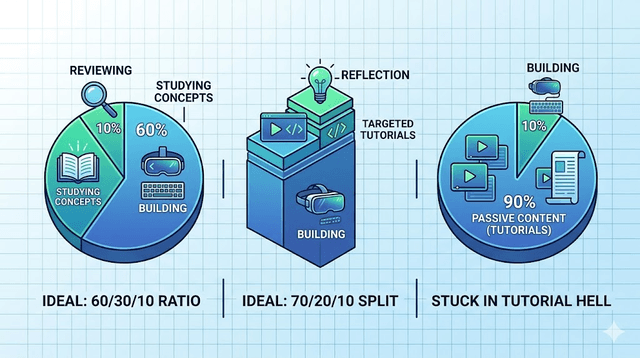
Step 2: Use the 60-30-10 learning ratio
A high-performing structure for tech learning:
- 60% building
- 30% studying concepts
- 10% reviewing and reflecting
Many learners invert this ratio and spend 80% in tutorials. Shift the balance. Build first, then study what blocks you.
Step 3: Follow a "just-in-time" resource strategy
Stop trying to complete every course chapter before touching projects. Instead, start a small project early and pull in resources only when needed.
Example: if you are learning web development, build a simple project in week one. When you hit state management problems, study state management then apply immediately.
This method improves transfer because knowledge is tied to active friction points.
Step 4: Build small projects with constraints
Constraints accelerate growth. If projects are too open-ended, you spend weeks deciding instead of shipping.
Use constraints like:
- Finish in 7 days
- Solve one clear user problem
- Include one feature that stretches your skill
- Publish publicly
Short cycles create momentum and increase confidence through visible outputs.
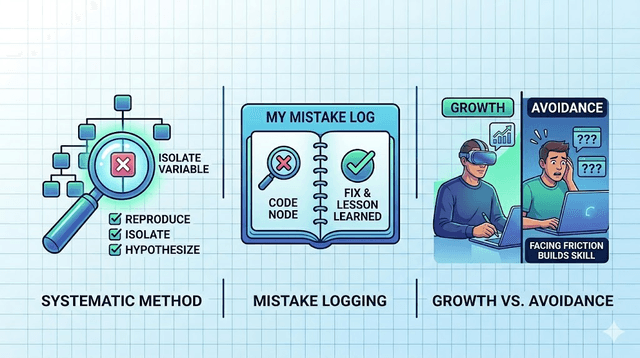
Step 5: Practice debugging intentionally
Debugging is one of the highest-value skills in technology. Yet many learners avoid it by asking for complete solutions too quickly.
A better debugging routine:
- Reproduce the issue consistently
- Isolate one variable at a time
- Read error messages slowly
- Form one hypothesis
- Test and document what changed
This process sharpens reasoning and reduces dependence on external help.
Step 6: Build a feedback loop every week
Without feedback, weak patterns persist. You need regular input from either peers, mentors, code reviews, or users.
Practical options:
- Share weekly progress in public
- Join focused communities with critique culture
- Request code or project reviews from practitioners
- Use AI as first-pass feedback, then validate with humans
Feedback is not optional if speed and quality both matter.
Step 7: Keep a learning log
A simple log captures what you learned, what broke, and what you fixed. This builds metacognition and helps you avoid repeating mistakes.
A useful template:
- What I built today
- What blocked me
- How I solved it
- What to improve tomorrow
Ten minutes of logging can save hours later.
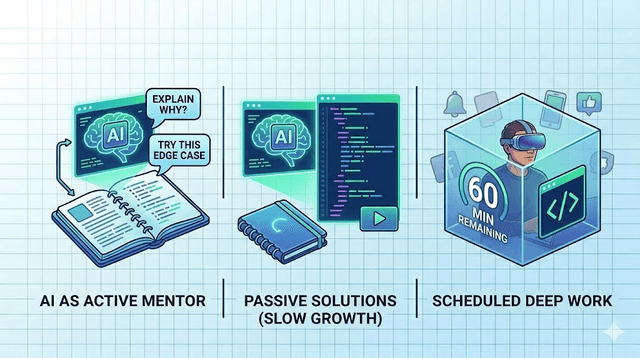
Step 8: Use AI strategically, not passively
AI can accelerate skill growth when used for explanation, debugging hints, and structured practice plans. It slows growth when used to copy complete solutions without understanding.
Use AI to:
- Explain concepts at your current level
- Generate practice exercises with answers
- Review your code for readability and edge cases
- Suggest improvement paths after each project
Always ask for reasoning, not only final code.
Suggested 12-week roadmap
Weeks 1-2: Foundation sprint
Learn essential syntax and core concepts. Build one tiny project immediately.
Weeks 3-6: Applied project phase
Build two small projects with increasing complexity. Publish both and gather feedback.
Weeks 7-9: Depth and debugging
Focus on performance, error handling, and maintainability. Refactor old code.
Weeks 10-12: Portfolio and proof
Polish your best project, write case studies, and prepare a clear skills narrative for opportunities.
This roadmap is flexible but structured enough to prevent drift.
How to choose resources without wasting time
Use this filter before committing:
- Is it project-oriented?
- Does it match my current level?
- Is the instructor clear and practical?
- Can I apply this in 24 hours?
If the answer to the last question is no, deprioritize it.
Common myths that slow learners down
Myth 1: "I need to finish one giant course first."
Reality: You need small build cycles and rapid application.
Myth 2: "I should learn everything before applying for opportunities."
Reality: Real opportunities emerge when you show evidence of execution.
Myth 3: "Speed means rushing."
Reality: Speed means reducing waste and tightening feedback loops.
Measuring progress the right way
Track outputs, not hours. Better metrics include:
- Number of projects shipped
- Bugs solved independently
- Features implemented end-to-end
- Quality of code reviews received
- Clarity of technical communication
These indicators reflect employable skill growth.
Final takeaway
You can learn tech skills faster in 2026 by replacing passive consumption with deliberate project cycles. Define outcomes, build under constraints, debug intentionally, and seek feedback every week.
The internet already has enough tutorials. What creates advantage now is execution quality and consistency. Start with one practical outcome, commit to a short build cycle, and iterate relentlessly. Fast learners are not necessarily smarter. They simply run better systems.
Who this method is best for
This roadmap works best for self-learners, career switchers, and junior practitioners building portfolio-ready skills. It also fits working professionals upskilling in evenings if they can maintain short, consistent project cycles.
Get Weekly AI + Tech Updates
Receive practical AI tools, workflows, and hand-picked resources in one concise weekly email.
AI & Software Writer
Akash Kumar is a software engineer with a master's degree in computer science. He writes about AI tools, software development, and emerging tech, drawing on his engineering background to test new AI products hands-on and explain how they fit into real development workflows for developers, students, and creators.