Best AI Tools for Students in 2026 (Free + Paid)

Best AI Tools for Students in 2026 (Free + Paid)
Students in 2026 are learning in a very different environment from even three years ago. The pressure is still familiar: keep up with classes, finish assignments, prepare for exams, and build career-ready skills before graduation. What has changed is the quality of support available. AI tools are no longer gimmicks that write generic essays. The best tools now help you think clearly, organize ideas, practice actively, and manage your time with less stress.
The problem is not access. The problem is selection. Most students install too many apps and end up juggling tabs, notifications, and duplicate workflows. A better approach is to create a focused stack where each tool does one job extremely well. This guide compares practical options for note summarization, writing support, problem solving, memory, and planning. It also explains when paid plans are worth it and when free plans are enough.
Why you can trust this guide
This guide is based on practical study workflows we repeatedly use for assignment planning, revision sessions, and research-heavy writing tasks. We evaluate each tool by how reliably it improves output quality and time-to-completion for real student tasks, not by marketing claims. We also review pricing and workflow friction because subscription fatigue is a real issue for students.
Evaluation method used in this comparison
Each recommendation is scored against four criteria:
- Accuracy and reasoning quality on course-level questions
- Workflow fit for students using Google Docs, Notion, or standard browser tools
- Citation and source transparency when research is required
- Free-plan usefulness before any paid upgrade
Quick comparison by use case
| Tool | Best For | Free Plan Quality | Main Limitation | | --- | --- | --- | --- | | ChatGPT | Concept explanation, outlines, practice questions | Strong | Better reasoning often needs paid tier | | Gemini | Google Workspace-native workflows | Good | Depth can vary by topic | | Perplexity | Research starting points with links | Strong | Sources still require manual validation | | Notion AI | Organizing notes and plans | Good | Works best only if you already use Notion heavily | | Grammarly | Final writing polish | Good | Not a substitute for argument quality | | Quizlet + memory tools | Flashcards and spaced repetition | Good | Output quality depends on note quality |
How to choose the right AI tool as a student
Before downloading anything, define your top bottleneck. Are you losing marks because your concepts are weak, because your writing is unclear, or because you run out of time? AI gives the biggest returns when it targets one specific bottleneck first.
Second, evaluate tools using four criteria: output quality, speed, source transparency, and price. Output quality means the answer is not just fluent but also accurate for your context. Speed matters because study sessions are time-boxed. Source transparency matters if you need to cite references or verify facts. Price matters because a student budget should prioritize high-value subscriptions only.
Third, avoid replacing learning with automation. If AI is doing your entire assignment, you might submit faster but understand less. Use AI to generate explanations, draft outlines, and test your understanding, then produce your own final work.
1) ChatGPT for guided learning and writing
ChatGPT remains one of the most flexible study tools in 2026. Free tiers are sufficient for many everyday tasks: clarifying concepts, building revision quizzes, summarizing long readings, and converting rough notes into structured outlines. Paid tiers become valuable if you need better reasoning quality, longer context windows, or frequent daily use.
Where ChatGPT helps most:
- Breaking down difficult topics into beginner, intermediate, and exam-level explanations
- Creating active recall questions from lecture notes
- Improving assignment structure without rewriting your voice
- Brainstorming project ideas with constraints
A high-impact prompt pattern is: context + goal + format + constraints. Example: "I am a first-year computer science student. Explain recursion in simple terms, then give two medium-level examples, then five practice questions with answers hidden at the end." This pattern produces more useful output than vague prompts.
2) Gemini for Google Workspace-first students
If your school workflow is heavily tied to Gmail, Docs, Slides, and Drive, Gemini has strong practical value. It can summarize email threads, turn class notes into presentation outlines, and help clean up documents quickly. Students who collaborate in Google Docs or rely on Android devices often find Gemini easier to adopt because it fits into tools they already use daily.
Gemini is particularly useful for:
- Converting scattered notes into concise summaries
- Drafting first-pass slide structure for presentations
- Clarifying technical topics with multiple examples
- Managing communication and task context across Google apps
Its best use case is workflow integration, not always deepest reasoning. Pair it with deliberate checking and your own edits.
3) Perplexity for research and citations
Many students waste hours validating whether a claim is trustworthy. Perplexity stands out by making source-backed answers central. Instead of only receiving an explanation, you get linked references you can inspect quickly. That saves time during literature reviews, policy analysis, and current-event assignments.
Use Perplexity when you need:
- Fast overviews with linked sources
- Starting points for further reading
- Side-by-side perspectives on a topic
- Citation discovery for essays and reports
Do not copy citations blindly. Open key links, confirm relevance, and check publication date. A source-backed answer is a good start, not automatic proof.
4) Notion AI for knowledge management
Students who already keep class notes in Notion can benefit from Notion AI for cleanup and organization. It helps transform rough lecture dumps into readable summaries, extract action items, and generate study checklists. This is less about "smart answers" and more about reducing friction in your personal system.
Best scenarios:
- Weekly note reviews after multiple classes
- Turning project briefs into execution plans
- Creating exam revision dashboards from mixed content
- Standardizing templates for each course
If you dislike building systems, Notion can feel heavy. But if you like structure, it becomes a powerful command center.
5) Grammarly for final polish
Even with strong ideas, unclear writing can reduce grades. Grammarly remains useful for grammar, clarity, and tone control. It is especially valuable for cover letters, scholarship essays, lab reports, and professional emails where language quality directly affects outcomes.
Key point: use Grammarly at the end of the process. Do not let it overwrite your intent early. Draft first, revise logic, then polish language.
6) Quizlet and memory tools with AI support
Memory still matters, especially for exams. Tools that generate flashcards from notes can save hours, but quality depends on your input. If notes are weak, cards are weak. Review generated cards before relying on them and remove vague or ambiguous prompts.
A practical method is to combine AI-generated flashcards with spaced repetition and short daily sessions. This outperforms last-minute cramming for most learners.
Free vs paid: where subscriptions are actually worth it
Free tools are enough for many students if used consistently. Paid plans are worth it when one of these is true:
- You use the tool every day for core work
- Better reasoning quality saves meaningful time
- You need longer context or faster performance
- Integration replaces multiple smaller tools
Do not subscribe to three overlapping assistants. Start with one paid tool after two weeks of free-plan testing.
Recommended minimal AI stack for students
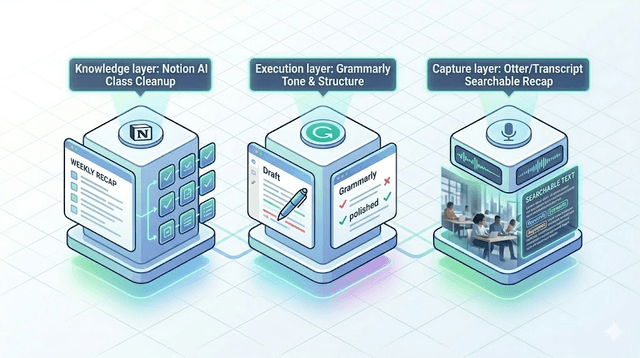
For most learners, this stack is enough:
- One general assistant (ChatGPT or Gemini)
- One research tool (Perplexity)
- One writing polisher (Grammarly or built-in editor help)
- One note system (Notion, Obsidian, or Google Docs workflow)
This combination covers understanding, research, output quality, and organization without unnecessary complexity.
Common mistakes students should avoid
The first mistake is over-automation. If AI writes everything, your comprehension drops. The second is tool hopping. Constantly switching platforms creates cognitive overhead and weak habits. The third is trusting output without verification. Always validate formulas, dates, and claims before submission.
Another hidden mistake is ignoring your own context. The best prompt in the world will fail if you do not provide constraints like course level, deadline, and output format. Good inputs create useful outputs.
Who this stack is for (and not for)
This stack is best for students who want to improve understanding and productivity while still doing original work. It is not for students trying to fully automate assignments. If your goal is long-term skill growth, use these tools for guidance, structure, and checking, then produce final work in your own words with your own reasoning.
Final verdict
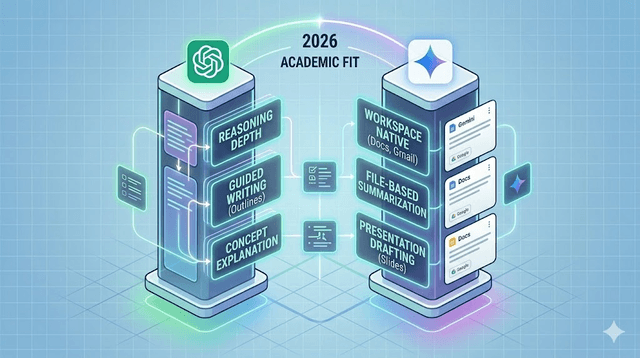
The best AI tools for students in 2026 are not the tools with the loudest marketing. They are the ones that fit your real workflow and improve consistency week after week. Start small, measure outcomes, and keep your stack lean.
If you are choosing today, begin with ChatGPT or Gemini for daily learning support, add Perplexity for source-backed research, and use one writing or memory layer for finishing quality. This setup keeps costs manageable while delivering strong academic leverage.
Use AI as a study multiplier, not a substitute for effort. When combined with active learning and clear routines, these tools can help you produce better work in less time and build skills that still matter after graduation.
Get Weekly AI + Tech Updates
Receive practical AI tools, workflows, and hand-picked resources in one concise weekly email.
AI & Software Writer
Akash Kumar is a software engineer with a master's degree in computer science. He writes about AI tools, software development, and emerging tech, drawing on his engineering background to test new AI products hands-on and explain how they fit into real development workflows for developers, students, and creators.