Best AI Video Generation Tools in 2026: What Actually Works for Creators
Best AI Video Generation Tools in 2026: What Actually Works for Creators
Two years ago, AI-generated video was easy to spot. Distorted faces, impossible physics, flickering textures, hands with six fingers. You watched it and immediately knew a machine had made it. That era is over.
In 2026, the best AI video tools produce footage that professionals are using in real marketing campaigns, corporate training videos, social content, and early-stage film production. The uncanny valley problem has not been fully eliminated, but the best platforms have reduced it to the point where most viewers cannot distinguish AI video from real footage — at least for shorter clips.
The challenge now is not whether the technology is good enough. It is choosing the right tool for your specific use case, budget, and creative workflow.
How to think about AI video tools in 2026
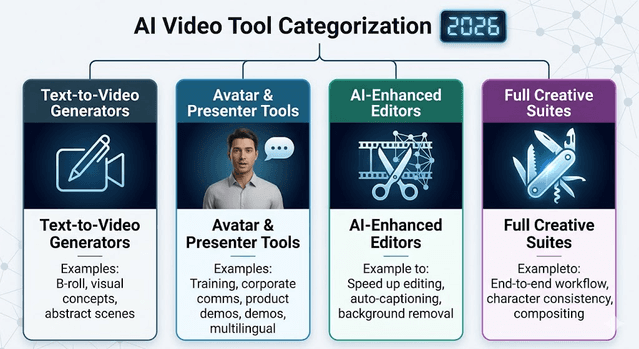
The category has split into distinct segments, and picking the wrong type of tool for your goal is the most common mistake creators make.
Text-to-video generators take a written prompt and produce a video clip. These are best for generating b-roll, visual concepts, abstract content, and scenes that would be expensive or impossible to film.
Avatar and presenter tools create realistic human presenters speaking directly to the camera from a script. These are designed for training videos, product walkthroughs, explainer content, and corporate communications where you need a consistent human face without expensive on-camera shoots.
Video editors with AI features — tools like CapCut and Clipchamp — are not purely generative. They accelerate post-production through automatic captioning, auto-editing, background removal, and scene assembly. These are essential for social content creators who film their own footage but need faster editing.
Full creative suites like Runway aim to combine generation, editing, compositing, and character consistency into a single workflow.
Understanding which category fits your work before evaluating specific tools saves significant time and money.
1) Google Veo (via Google Flow) — Best for cinematic quality and long-form consistency
Google's Veo model, now on its 3.1 iteration and accessible through Google Flow and Google Vids, has established itself as one of the strongest options for creators who need long, coherent, high-quality video output. Where many AI video tools produce strong 5-to-10-second clips but fall apart over longer durations, Veo generates coherent videos well over one minute in length while maintaining consistent environments and character appearance.
The directorial control is a genuine advantage. Creators can specify camera movements — timelapses, aerial shots, dolly moves — and receive results that match the description with real precision. For filmmakers and producers who need to craft a complete visual narrative rather than just a single clip, Veo's combination of duration and control is the best available in 2026.
Best for: Filmmakers, content strategists, and marketers who need cinematic-quality footage with narrative structure. Longer videos where consistency across frames matters.
Pricing: Google AI Pro at $19.99/month for 1,000 credits (watermarked). Google AI Ultra at $249.99/month for 25,000 credits without watermarks.
Watch out for: Premium pricing for commercial use. The Ultra plan is necessary for production-grade output without watermarks.
2) Runway — Best for professional creative control
Runway has been a favorite of visual artists and creative professionals since its early days, and in 2026 it has grown into one of the most comprehensive AI video creation platforms available. What makes Runway different is the depth of control it provides beyond basic generation.
Runway's Gen-4 model handles cinematic-quality clips with strong physical consistency. Its "Act Two" feature extends human performance — you can film a real actor once, then use AI to paste that performance onto any AI-generated character. This has become especially useful for stylized content where creators want consistent character performance without expensive reshoots. The platform also includes compositing, editing, and AI "Magic Tools" that let creators refine and combine clips after generation.
Best for: Creative professionals who need more than a simple generator. VFX artists, filmmakers, and marketers who want to control every element of the output. Teams producing premium-tier content.
Pricing: Free plan with 125 one-time credits. Standard plan at $15/month unlocks full model access and 625 monthly credits. Higher tiers available for heavy production use.
3) Pika — Best for fast social content
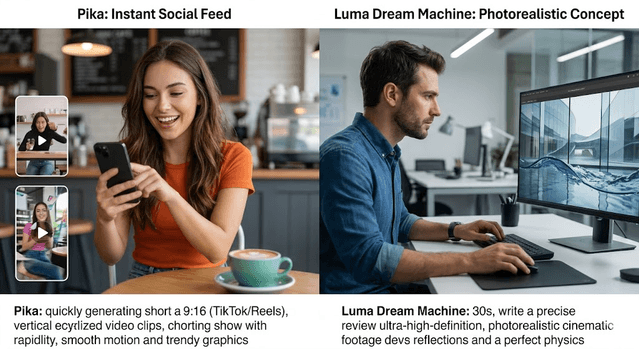
Pika has built a reputation for speed and simplicity, and in 2026 it remains the go-to for creators producing short-form content at high volume. If your workflow involves creating TikToks, Reels, or YouTube Shorts quickly, Pika produces solid results without requiring detailed technical prompts or extensive iteration.
The output quality is not at the cinematic level of Veo or Runway, but for social platforms where content is consumed quickly and engagement matters more than production value, Pika hits the right balance of speed, ease, and quality. The generation time is fast, the interface is clean, and the pricing is reasonable for creators working at volume.
Best for: Social media creators, digital marketers, and small business owners who need quick turnaround on short-form video without large budgets.
Pricing: Free plan available. Paid plans for higher resolution and faster processing.
4) HeyGen — Best for avatar and presenter videos
HeyGen is specifically designed for the use case of AI presenters — realistic human avatars delivering scripted content directly to the camera. It has earned a 4.8 out of 5 rating among real users and is widely used by training teams, marketing departments, and content creators who need a professional-looking presenter without filming a human on camera.
Key capabilities include multilingual output (the avatar speaks and lip-syncs in multiple languages from the same script), a collaborative workspace for team projects, product placement integration, and B-roll generation. The platform also provides an outline of what it plans to generate before creating the video, allowing for last-minute adjustments.
The avatar quality at the top tiers is strong — not indistinguishable from a real human in close inspection, but professional-grade for corporate and marketing content.
Best for: Corporate training videos, product demonstrations, multilingual marketing content, and any use case where a consistent on-screen presenter is needed without on-camera talent.
Pricing: Free plan allows up to 3 videos per month. Creator plan at $29/month for unlimited generated videos.
Watch out for: Entry-level avatar quality can look robotic. Invest time in selecting and customizing the right avatar for your use case before producing at volume.
5) Luma Dream Machine — Best for realism and concept development
Luma AI's Dream Machine has carved out a specific niche: photorealistic video generation with exceptional motion quality. Where some tools produce visually striking but physically unrealistic movement, Luma focuses on generating footage that looks like it was genuinely filmed in the real world.
This makes it particularly strong for concept development stages, where you want to show a client or stakeholder what a scene will look or feel like before committing to production. The realism of the output helps sell the concept in a way that more stylized or obviously AI-generated footage cannot.
Best for: Concept visualization, pre-production planning, and high-realism commercial content. Creators who prioritize visual authenticity over speed.
Pricing: Plus plan starts at $30/month. Pro at $90/month. Ultra at $300/month for high-volume production.
6) CapCut — Best AI-enhanced video editor for creators
CapCut is not primarily a generator but deserves inclusion in any serious content creator's toolkit. It excels at post-production with AI features that dramatically accelerate editing: automatic captioning, background removal, beat-synced editing, AI voiceover, smart scene cutting, and template-based assembly.
For creators who film their own footage — vlogs, tutorials, interviews, product reviews — CapCut compresses hours of editing work into minutes. The AI features handle the repetitive, time-consuming parts of post-production so creators can focus on content decisions rather than technical assembly.
Best for: YouTube creators, podcast editors, social media managers, and anyone who films their own content and needs faster editing without sacrificing quality.
Pricing: Free with core features. Premium plans remove watermarks and unlock advanced AI tools.
What to expect next
The pace of improvement in AI video is faster than almost any other AI category. Between now and the end of 2026, several developments are expected to make the technology more accessible and more powerful. Neural character mapping — the ability to generate consistent characters from a few photos and use them across unlimited scenes — is becoming a standard feature rather than a premium add-on. Synchronized audio generation, where the AI automatically produces fitting music and sound effects alongside the video, is reducing the need for separate audio production. Long-form narrative video is advancing steadily, with platforms extending reliable generation from minutes toward feature-length content.
Building a practical video creation workflow
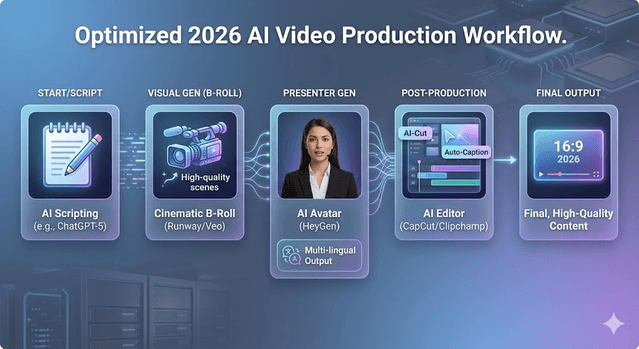
Most creators do not need one premium tool — they need a sensible combination of tools for different stages of the process. A practical 2026 content workflow might look like this: use a script writing AI to draft and refine the content, use a generation tool like Veo or Runway for high-quality b-roll and visual sequences, use HeyGen for presenter segments if needed, and use CapCut or a similar editor to assemble, caption, and finalize the output.
Match each tool to its strength. Overpaying for cinematic generation tools when you primarily create short social clips wastes your budget. Relying on a social-focused tool when you need professional-grade output compromises your results.
Final verdict
The best AI video tool in 2026 is the one that fits your actual workflow, not the one with the most impressive demo. Start by identifying whether your primary need is generation, avatar presentation, or post-production editing. Then choose one tool in that category, test it for two weeks on a realistic project, and measure the time and cost savings before committing to a subscription.
For most individual creators: Pika for speed, Runway for quality, HeyGen for presenter content, and CapCut for editing. For professional production teams: Veo and Runway at the premium tier are where the industry's best output currently lives.
Get Weekly AI + Tech Updates
Receive practical AI tools, workflows, and hand-picked resources in one concise weekly email.
AI & Software Writer
Akash Kumar is a software engineer with a master's degree in computer science. He writes about AI tools, software development, and emerging tech, drawing on his engineering background to test new AI products hands-on and explain how they fit into real development workflows for developers, students, and creators.