Best Mechanical Keyboards in 2026: Top Picks for Typing, Gaming, and Work
Best Mechanical Keyboards in 2026: Top Picks for Typing, Gaming, and Work
The mechanical keyboard market in 2026 is the best it has ever been for buyers across every budget. What used to cost $300 or more — gasket mounts, hot-swappable PCBs, wireless connectivity, quality pre-lubed switches — now ships on budget boards under $70. The mid-range is intensely competitive. And a genuinely interesting technology shift, the rise of Hall Effect magnetic switches, has changed what "best for gaming" means.
If you have been putting off buying a mechanical keyboard because the options felt overwhelming or expensive, 2026 is an excellent time to pull the trigger. This guide covers the best options for typing, gaming, and all-around productivity use at every price point.
What changed in 2026: Hall Effect switches go mainstream
The biggest technology shift in the mechanical keyboard market over the past two years has been the mainstream adoption of Hall Effect switches. Traditional mechanical switches — Cherry MX Reds, Blues, Browns, and their clones — use physical contact between metal parts to register a keypress. The actuation point is fixed at the factory and does not change.
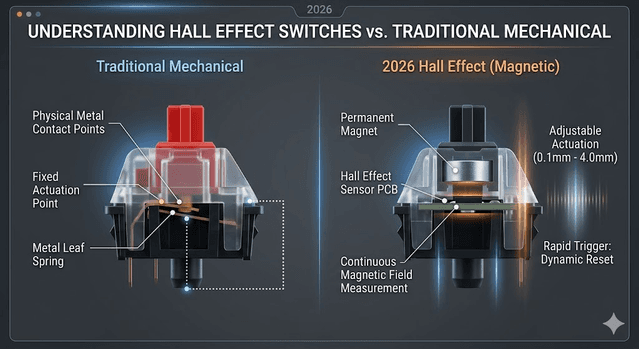
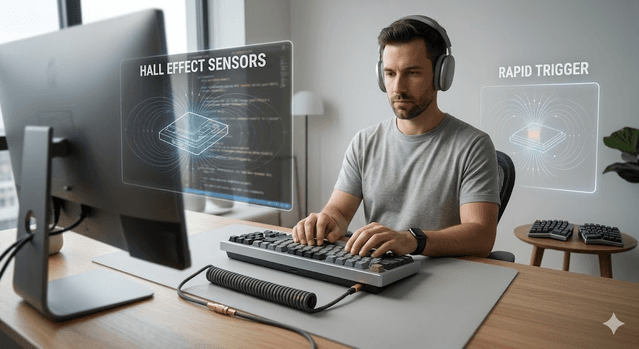
Hall Effect switches use magnets instead of physical contact. The position of the key is measured continuously by sensing the magnetic field. This creates two advantages that have made them dominant in competitive gaming: adjustable actuation (you can set the exact point at which a keypress registers, from 0.1mm to 4.0mm) and Rapid Trigger (the switch resets as soon as you release it, allowing faster back-to-back keypresses).
As of April 2026, roughly 40% of tracked professional esports players use Hall Effect or analog optical switches — a dramatic shift from near-zero adoption just a few years ago. For competitive first-person shooter players specifically, the advantage in movement responsiveness is real and measurable.
For typists and general productivity users, traditional mechanical switches remain an excellent choice and often feel better to type on than Hall Effect alternatives. The switch revolution is primarily relevant to competitive gaming.
Best mechanical keyboard overall: Keychron V1 Ultra 8K
Tom's Guide currently rates the Keychron V1 Ultra 8K as the best mechanical keyboard for most people in 2026, and the reasoning is sound. It offers 8K polling rate (meaning the computer reads the keyboard's state 8,000 times per second rather than the standard 1,000), solid build quality, gasket mount construction for a soft and comfortable typing feel, hot-swappable switches so you can change switches without soldering, and strong wireless connectivity.
At its price point, it represents genuinely strong value for someone who wants one board that handles typing well, works for everyday gaming, and lasts for years without feeling outdated.
Best for: Most users who want a single high-quality board for work and general use.
Best for competitive gaming: Razer Huntsman V3 Pro TKL
The data here is unambiguous. The Razer Huntsman V3 Pro TKL is used by more professional esports players than any other keyboard tracked in 2026 — roughly 15% of all tracked pros, placing it at the top of competitive hardware charts. This is not marketing; it reflects the choices of people who make their living winning games.
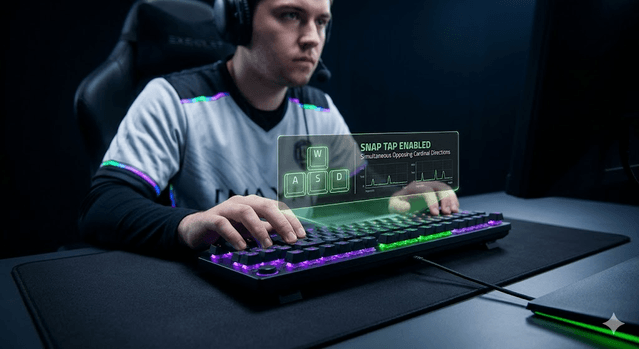
The TKL (tenkeyless) layout removes the number pad, creating more desk space for wide mouse movements — the dominant preference in competitive gaming globally. Razer's Gen-2 Analog Optical switches offer adjustable actuation from 0.1 to 4.0mm, Rapid Trigger, and Snap Tap for simultaneous opposing cardinal direction input.
Important caveat: Snap Tap is banned in CS2 ranked play. If Counter-Strike is your primary game, verify current rules before purchasing for competitive use. Also note a documented coil whine issue affecting some units (estimated 15-30% of buyers). The defect is not universal, but worth factoring into your decision.
Best for: Competitive FPS players who want a board validated by professional-level usage.
Best budget mechanical keyboard: AULA F75 Pro ($68.99)
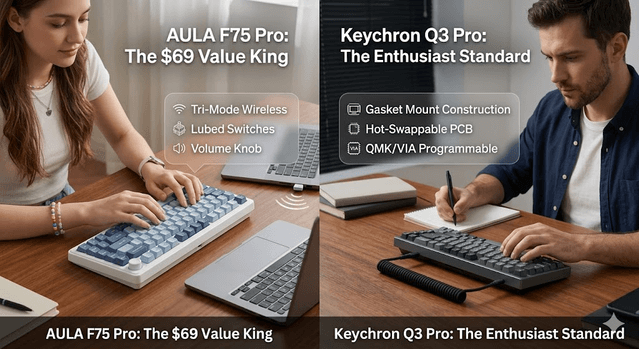
The AULA F75 Pro is the most recommended budget mechanical keyboard of 2026, and the case for it is straightforward. At under $70, it ships with tri-mode wireless (Bluetooth, 2.4GHz wireless, and wired), hot-swappable pre-lubed switches, PBT keycaps (which feel and sound better than ABS and do not develop a shine with heavy use), a volume knob, and South-facing RGB LEDs. This combination of features at this price point was not available at twice the price three years ago.
For someone buying their first mechanical keyboard, or looking for a quality everyday board without spending enthusiast-level money, the F75 Pro is the clearest recommendation in 2026.
Best for: First-time buyers, budget-conscious users, and anyone who wants a solid daily driver without overpaying.
Best for typing and long-term use: Keychron Q3 Pro
The Keychron Q3 Pro is the standard-setter for enthusiast typing keyboards in 2026. It uses a gasket mount — the PCB floats on silicone gaskets rather than screwing directly to the aluminum case — which produces a softer, deeper typing sound and more comfortable feel over long sessions compared to direct-mount boards.
The CNC-machined aluminum case eliminates flex and hollow resonance. Pre-lubed Gateron G Pro switches feel smooth from day one. It adds Bluetooth 5.1 wireless, full QMK and VIA programmability (allowing complete remapping of every key without software running in the background), and a hot-swappable PCB.
If you type for hours every day — writing, coding, documentation — this is the board designed for that use case. The gasket mount is genuinely noticeable compared to plastic alternatives, and the investment pays back over years of comfortable daily use.
Best for: Writers, developers, and anyone who types heavily and wants a board designed to last indefinitely.
Pricing: Mid-range premium — worth it for daily heavy typing use.
Best wireless Hall Effect keyboard: ASUS ROG Azoth 96 HE
GamesRadar named the ASUS ROG Azoth 96 HE the best gaming keyboard overall for 2026, and the specification is remarkable: Hall Effect switches with wireless connectivity and 8K polling rate. Until recently, Hall Effect boards were primarily wired. The Azoth 96 HE adds an OLED touchscreen, tri-mode wireless, and Hall Effect performance in a 96% layout (full alphanumeric plus number pad, no wasted space).
For gamers who want Hall Effect responsiveness without being tethered by a cable, this is currently the only board in its class.
Best for: Gamers who want wireless Hall Effect performance. Premium wireless gaming setup.
Pricing: Upper-mid to premium range. Expect to pay for the unique wireless Hall Effect combination.
Best for ergonomics and wrist health: ZSA Voyager
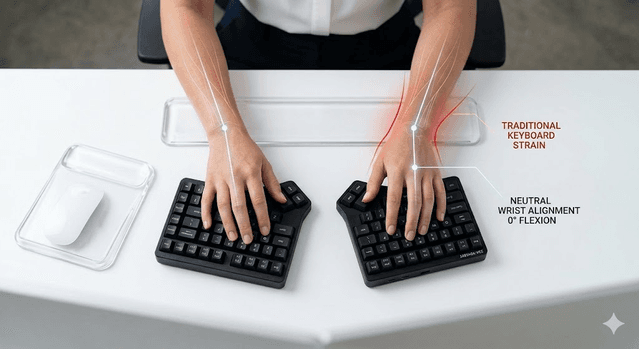
If you experience wrist pain, numbness, or discomfort from long typing sessions, a split ergonomic keyboard addresses the root cause rather than the symptom. The ZSA Voyager is the thinnest and most portable split keyboard available in 2026, with 52 keys arranged in two separate halves that allow you to position each half at a natural wrist angle.
The learning curve is real — expect one to three weeks before your typing speed returns to normal — but most people who make the switch report that their fingers barely leave the home row once they adapt, and the wrist discomfort resolves. ZSA's browser-based Oryx configurator handles key remapping visually, and the board includes a built-in typing trainer.
Best for: Anyone experiencing RSI (repetitive strain injury) or wrist pain. Programmers and writers who want maximum long-term typing efficiency.
How to choose your switch type
Before buying any mechanical keyboard, decide on your switch type. This determines the fundamental feel and sound of the board.
Linear (Red, Silver, Yellow): Smooth keystroke with no tactile bump and no click. Popular for gaming because the uninterrupted downstroke allows fast, consistent input. Also preferred by typists who want a quiet, fast feel. Examples: Gateron Red, Cherry MX Red.
Tactile (Brown, Clear): A small bump at the actuation point provides physical feedback when the key registers, without an audible click. Good all-around choice for mixed gaming and typing use. Examples: Gateron Brown, Cherry MX Brown.
Clicky (Blue, Green): Tactile bump plus an audible click sound. Satisfying to type on but loud — not appropriate for shared office environments or late-night sessions if others are nearby. Examples: Gateron Blue, Cherry MX Blue.
If you are buying your first mechanical keyboard and are unsure, start with Brown switches. The tactile feedback helps you understand why mechanical switches feel different from membrane keyboards, and the sound level is acceptable in most settings.
What to look for beyond switch type
Layout: Full-size boards include a number pad. TKL removes the number pad for more desk space. 75% and 65% layouts are more compact. 60% removes function row and arrow keys. Choose based on whether you use a number pad regularly and how much desk space you want.
Hot-swap: A hot-swappable PCB lets you change switches without soldering. This is highly recommended — it means you can try different switches later without buying a new board.
Gasket vs. plate mount: Gasket mount produces a softer, more cushioned typing feel. Plate mount is firmer and more direct. Neither is objectively better; personal preference determines which you prefer.
Wireless: If you want a clean desk with no cables, ensure the board supports 2.4GHz wireless (low latency) rather than only Bluetooth. Bluetooth introduces slightly more input delay — acceptable for typing, potentially problematic for competitive gaming.
Final recommendation by use case
For most people starting out: AULA F75 Pro delivers remarkable value and features at an accessible price. For premium everyday typing: Keychron Q3 Pro offers a build quality and typing experience that justifies the higher cost for heavy daily use. For competitive gaming: Razer Huntsman V3 Pro TKL is validated by professional usage data. For wireless gaming: ASUS ROG Azoth 96 HE is the only wireless Hall Effect option in 2026. For wrist health: ZSA Voyager is the clear recommendation for anyone dealing with RSI or seeking an ergonomic upgrade.
The best time to buy a mechanical keyboard is now. Quality has never been higher relative to price, the technology is mature, and whether your priority is fast typing, competitive gaming, or wrist comfort, a board exists that genuinely improves the experience.
Get Weekly AI + Tech Updates
Receive practical AI tools, workflows, and hand-picked resources in one concise weekly email.
Tech Reviews & Productivity Writer
Abhishek is a software engineer with a bachelor's degree in computer science. He covers consumer tech reviews and productivity systems, focusing on real-world comparisons of devices and apps and on practical workflows that help people get more done without buying into hype.